
Main /
ℛ Base - Run Spindles
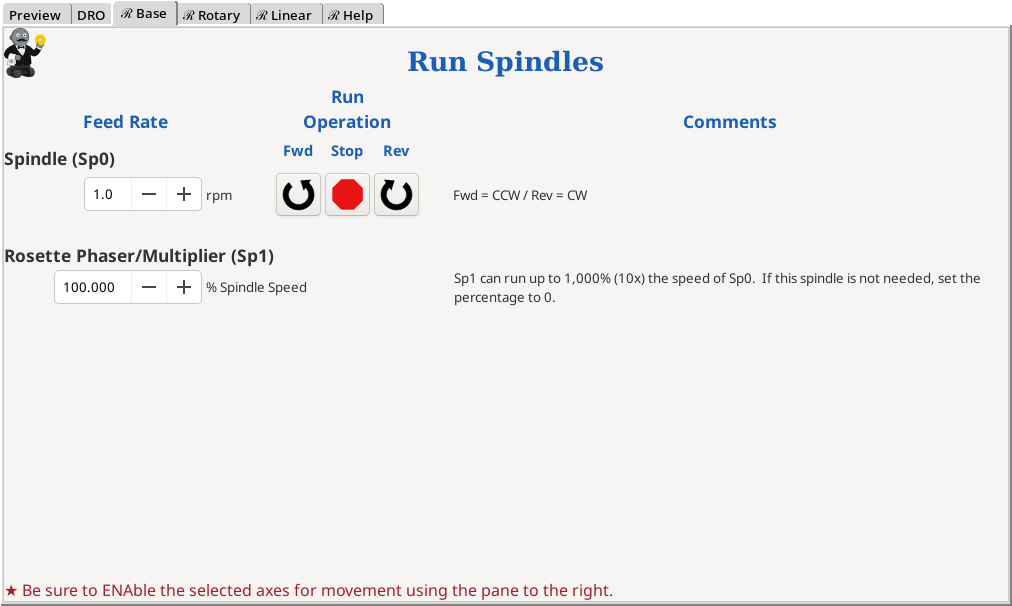
Click on the image to see a larger version
This menu screen is used to run the spindles:
- Main spindle (Sp0)
- Rosette Phaser/Multiplier (Sp1)
Fields & Buttons
Feed Rate

| This number represents the feed rate for the spindle’s rotation (the rotational velocity). For the main spindle, this is in rpm. |
|
| ||

| For the the rosette phaser/multiplier, this is specified as a multiplier of the spindle’s (Sp0) rotational velocity. If it is 200%, then the Sp1 feed rate is twice the rate as Sp0. | |
Notes:
- The range of speeds for Sp0 is 0 to 10 rpm.
- The range of speeds for Sp1 is 0 to 1000% of Sp0 (0 to 100 rpm).
Run Operation

| This button directs the spindle(s) to run in a forward (CCW) direction. Forward for the spindles is the same as on a traditional late. The spindle(s) will continue running until the stop button is depressed. The S Gcode is used to set the spindle speeds, and then the M3 Gcode is used to run the spindle(s). | |
|
| ||

| This button directs the spindle(s) to stop running. The M5 Gcode is used. | |
|
| ||

| This button directs the spindle(s) to run in a reverse (CW) direction. The spindle(s) will continue running until the stop button is depressed. The S Gcode is used to set the spindle speeds, and then the M4 Gcode is used to run the spindle(s). | |
Additional Notes
If you wish to run the Sp0 and Sp1 in different directions, you will need to develop a Gcode macro to run. Possibly, there is one in the Gcode Library
| spacer line |
|
eMail comments to |