
Main /
Rose Engine Butler System Status Panel
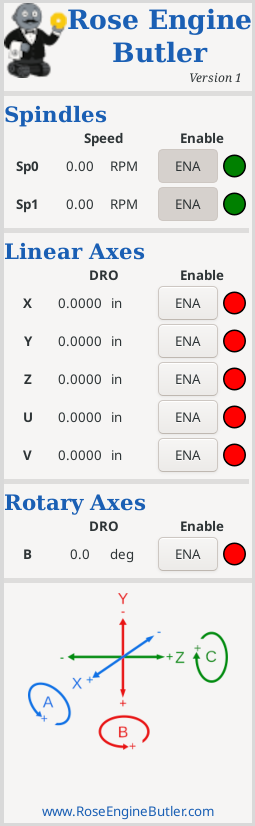
The side panel is used to show axis information, and to enable or disable any axis.
Spindle Speeds
This is the current speed of each spindle. It only changes from 0 if the spindle is being moved.
Notes:
- Spindle speeds can be set in Gcode using the S command (e.g., S5 $0 to set the Sp0 spindle’s speed to 5 rpm).
- This value shown does not reflect any speeds set using other menus or Gcode (i.e., the S command); it shows the actual speed when running.
- The value shown reflects the settings for the spindle in the configuration. For example, if it is set so that 18 motor revolutions per spindle revolution, then a spindle speed of 1 rpm reflects 18 rpm on the motor. If this needs to be a different value, you will need to make a change to the SCALE and STEP_SCALE parameters in the respective axis file found in the directory.
Directions for updating the Axis Configuration File.
DRO (Digital Read Out)
This is the distance for the axis to move by LinuxCNC. There is no direct feedback, so this is the best estimate that LinuxCNC can give.
Positive values are movement in the positive direction for that axis; negative values are movement in the negative direction for that axis.
Notes:
- If the axis is moved manually (when it is disabled), this does not reflect that.
- There is no feedback on the movement. If some issue is encountered (e.g., the motor gets jammed), this will not reflect the current state.
- As noted in item #3 above, this is based on the ENABLE_SCALE and STEP_SCALE parameters in the respective axis file.
Directions for updating the Axis Configuration File.
ENAble Status
When an axis’ ENAble button is engaged, the axis’ status is indicated with lights shown to the right of the respective axis.
|
|
 |
Axis is enabled |
|
|
 |
Axis is disabled |
Notes:
- You will need to disable an axis before manually moving it.
- Attempting to run an axis when it is not enabled will generate an error message and probably move the machine to an “off” state (F2 can be used to toggle the machine back on).
|
eMail comments to |